Standing Desk vs Standing Desk Converter: Which Is Better? (October 2026)
A standing desk replaces your desk, while a converter sits on top of one you already own. Choose a full desk for a dedicated sit-stand setup, or a converter to add standing to an existing desk.
On this page (8 sections)
- Standing desk vs standing desk converter: what moves?
- How much room does each option need?
- How do their height ranges compare?
- Which setup is easier to get ready?
- How does each option handle your keyboard and monitor?
- What about stability and weight limits?
- Which is easier to keep in your workspace?
- Which standing desk or converter fits your needs?
A standing desk replaces your desk, while a converter sits on top of one you already own. Choose a full desk for a dedicated sit-stand setup, or a converter to add standing to an existing desk.
The main difference in a standing desk vs standing desk converter is what moves: a full desk raises its desktop, while a converter raises a platform above your current desk. Your available room, existing furniture and preferred work surface help decide which fits.
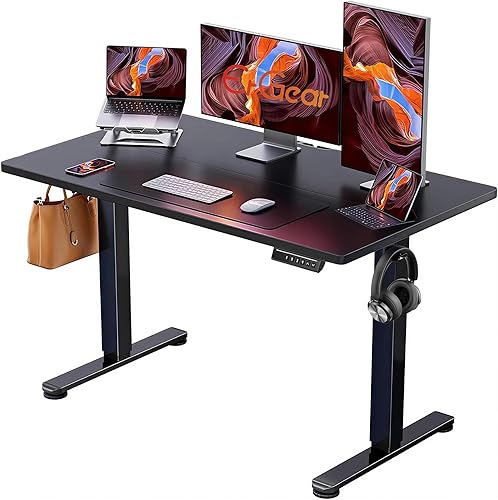
The ErGear is a full electric desk with an approximately 48 x 24 inch surface. The VIVO and FlexiSpot are both 36 inch converters, with different lift designs and layouts.
We compared their dimensions, adjustment details and features. Our scores weigh those specs and features against the needs of someone choosing between a full desk and a converter.

Standing desk vs standing desk converter: what moves?
A full standing desk raises its desktop and replaces your current desk. A converter raises only a platform and sits on top of a desk you already have.
The ErGear adjusts electrically from 28.35 to 46.46 inches. Its desktop is about 48 by 24 inches, giving you a complete work surface that moves between sitting and standing positions.
The VIVO and FlexiSpot converters sit on an existing desk. VIVO uses dual pneumatic springs and has a keyboard tray that rises with the top, while FlexiSpot uses a mechanical spring lift and includes a keyboard tray.
A converter can make sense if your current desk is in good shape and you want to keep it. A full desk may suit you better if the existing desk is too small or doesn't fit your preferred working height.
How much room does each option need?
A full desk needs floor space, while a converter uses the desktop space you already have. Measure both the floor and the work surface before choosing.
The ErGear desktop measures about 48 by 24 inches. It needs a place on the floor, room for your chair and enough space around the desk for normal movement.
Both converters are 36 inches wide. The VIVO top measures about 36 by 22 inches, and the FlexiSpot measures 24.9 inches deep overall.
A converter can crowd a smaller desk, especially when a monitor, laptop, keyboard and other items already share the surface. Check the base dimensions and movement clearance, then consider what will still fit beside or behind it.
For more size guidance, see our standing desk size guide. If you need a compact full desk, our small standing desk picks may fit better than a converter.
How do their height ranges compare?
A full desk adjusts from the floor, while a converter adjusts above the desk underneath it. Those measurements start at different points, so compare the complete setup with your own seated and standing positions.
ErGear's desk adjusts from 28.35 to 46.46 inches. Its electric mechanism changes the height of the whole work surface.
The VIVO converter rises up to 17 inches above the desk. Confirm the lowest working height of either converter before choosing one, since that affects your seated keyboard and screen positions.
Your current desk height matters with either converter. Add the converter's platform height to the height of the desk below it, then check whether the total fits your standing position.
Standing desk vs standing desk converter for a small room
A converter may suit a small room if you already have a desk and can fit the raised platform on top. A full desk needs its own floor footprint, though it can replace your current desk.
If your desktop is narrow or already full, a converter may take away space you use every day. For more compact options, compare our best budget electric standing desks.
Which setup is easier to get ready?
These converters need less assembly than a full desk. They also let you keep your current desk in place.
ErGear requires assembly, with instructions and tools included. Its electric motor and 4 memory presets are part of the full desk setup.
VIVO requires you to attach the keyboard tray and feet before use. FlexiSpot comes almost fully assembled and needs the keyboard tray attached.
A converter still needs a suitable desk underneath it. Check that the surface is level, supports the combined weight and leaves room for the platform's movement.
For help selecting a full desk, read our guide on how to choose an electric standing desk.
How does each option handle your keyboard and monitor?
A full desk raises the whole desktop, while these converters have separate keyboard trays below their monitor platforms. The right layout depends on where you need your keyboard and screen when standing.
The ErGear gives you one full desktop, with 4 memory presets for preferred heights. You can save sitting and standing positions, along with other heights you use.
The VIVO has an approximately 36 by 22 inch top and a 64 by 27 cm keyboard tray. The tray rises in sync with the top, so the keyboard and monitor move together.
The FlexiSpot includes a keyboard tray and a 36 inch wide top. Its top supports up to 33 pounds, and the keyboard tray supports up to 4.4 pounds.
Check the dimensions of your own monitor base, laptop and keyboard before settling on a converter. The overall width alone won't tell you whether your gear fits the usable surface.
What about stability and weight limits?
Check both the equipment load and the supporting desk when choosing a converter. FlexiSpot has separate limits for its top and keyboard tray, while ErGear supports the entire setup on its own frame.
The ErGear has an alloy steel frame and a 176-pound capacity. ErGear says its lifting columns keep the desk stable at maximum height.
The VIVO uses an alloy steel frame and dual pneumatic springs with a 15 kg lift assist. Confirm the total equipment load limit before planning a heavy monitor setup, since lift assistance alone doesn't establish separate platform and tray capacities.
FlexiSpot has a reinforced steel frame, a 33-pound top surface limit and a 4.4-pound keyboard tray limit. Keep the monitor, laptop and accessories within those limits.
If stability is a key concern, our guide to why a standing desk wobbles explains which desk details and setup checks matter.
Which is easier to keep in your workspace?
A converter keeps your existing desk, while a full standing desk replaces the desk or adds another workstation. The best fit depends on whether your current furniture already works for you.
Choose a converter if you like your desk and mainly want a way to raise your screen and keyboard. The converter occupies part of the surface, leaving only the remaining desktop for other tasks.
Choose a full desk if you want the entire desktop to move or need a different size and layout. The ErGear offers a wider work surface at about 48 inches, compared with the 36 inch converters.
Think about cables and items stored around your desk, too. Leave enough cable slack for the full movement range, with clear space above and below moving surfaces.
Which standing desk or converter fits your needs?
Choose the ErGear for a full electric standing desk, or a converter if you want to keep your current desk. VIVO offers a synchronized dual-tier layout, while FlexiSpot combines a mechanical spring lift with separate top and tray load limits.
The ErGear suits you if you want memory presets and a complete moving work surface. Its approximately 48 by 24 inch top and 28.35 to 46.46 inch adjustment range make it an option for replacing your current desk.
The VIVO converter suits you if you prefer a dual-tier arrangement with a tray that rises with the monitor surface. It uses dual pneumatic springs and rises up to 17 inches above the desk.
The FlexiSpot converter suits you if you want a 36 inch platform for an existing desk, with a keyboard tray and mechanical spring lift. Check that your devices fit within its surface and tray limits.
For a standing desk vs standing desk converter decision, start with the furniture you want to keep and the working heights you need. Choose the option that fits those heights, your equipment load and the space available.
For more models, see our best electric standing desks for a home office.
Frequently asked questions
Is a standing desk better than a standing desk converter?
A standing desk is better if you want the whole work surface to move, while a converter suits you if you want to keep your current desk. The right choice depends on the floor space available for a replacement desk and the room a converter would take on your existing surface.
Can a desk converter work on any desk?
A converter needs a stable, level surface with enough room and weight capacity for the converter and your work gear. Measure your desktop, check its load limit, and make sure the converter's base fits fully on it with enough clearance for its movement.
Do standing desk converters adjust as high as full desks?
It depends on the model and the height of the desk underneath. The VIVO converter rises up to 17 inches above your desk, while the ErGear adjusts from 28.35 to 46.46 inches from the floor, so compare the total height with your seated and standing positions.
Which takes less room, a standing desk or a converter?
A converter can avoid replacing your desk, but it still needs clear space on your current desktop. The FlexiSpot converter measures 36 inches wide and 24.9 inches deep, so compare those dimensions with your desktop and the floor space available for a full desk.
Can I use a converter with a laptop?
Yes, the FlexiSpot converter accommodates laptop, keyboard and monitor setups, and its top surface supports up to 33 pounds. Check the combined weight of your devices and accessories, allow enough room for their layout, and keep the keyboard tray within its separate 4.4-pound limit.


