L-Shaped Standing Desk Buying Guide
An L-shaped standing desk suits a corner workspace with several screens or separate work zones. Measure both sides of the desk, check the return direction and leave room for the chair, cables and height adjustment.
On this page (7 sections)
- What should you measure before buying an L-shaped standing desk?
- What should you look for in the lift and height range?
- How much desktop space do you need?
- How should you compare frame stability and weight capacity?
- Which extra features are worth considering?
- How do you choose among these L-shaped standing desks?
- What should you check before ordering?
An L-shaped standing desk fits a corner and gives you separate areas for screens, paperwork or other work. Before you buy, measure both sides of the footprint, check the return direction and compare the height range with the way you work.
This guide covers the room fit, desk layout, lift features and storage choices that matter. We also include 4 desks with different features to help you narrow your options.
For dimensions and measuring steps, see our L-shaped standing desk dimensions guide. If you are deciding whether a corner desk fits your room better than a straight one, compare L-shaped vs straight standing desks.
What should you measure before buying an L-shaped standing desk?
Measure the desk's full width and depth, then check the space around it for your chair, doors and walking path. An L-shaped top has 2 sides, so a quick wall-to-wall check can miss how far the return extends into the room.
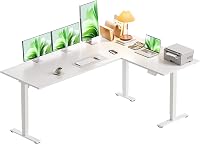
The Casaottima measures 63 in wide by 47 in deep. Compare those outside measurements with your room, and mark the footprint on the floor with painter's tape before you order.
Next, measure the path from the entry to the desk location. Check door openings and tight turns against the largest pieces you'll need to carry through, and leave room to assemble the desk near its final spot.
How much space does an L-shaped standing desk need?
The desk needs enough room for its complete footprint plus space to sit, stand and move around it. A 63 x 55 in desk, for example, takes a different corner than a 63 x 47 in desk.
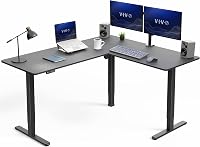
VIVO's assembled outside surface measures 63 x 55.2 in. Its depth is over 8 in greater than the Casaottima's 47 in, so compare both dimensions instead of relying on the width alone.
Allow space behind and beside the desk for cords and access to outlets. The legs and frame also need clearance from baseboards, radiators and cabinets as the desk moves up and down.
If you want to check different footprint examples, our standing desk sizes guide can help you compare widths. Width alone won't tell you how far an L-shaped return reaches into the room.
How do you choose the return side?
Choose the return side by matching the desk to the room's doors, windows and walking routes. Reversible models give you a choice during assembly, but the assembled layout still needs to fit the space.
Stand at the spot where you'll work and picture the return on your left, then on your right. Consider whether it will block a drawer, a cabinet door or the path you use to reach the desk.
Casaottima, VIVO, OffiGo and SIAGO all have reversible designs. Check the return orientation and assembly steps before you start, especially if you are placing the desk against 2 walls.
What should you look for in the lift and height range?
Compare the height range with the positions where you can sit and stand comfortably at your desk. A wide range alone doesn't guarantee a good fit, since your chair, monitor and keyboard positions matter too.
SIAGO's 3 presets let you save different desktop heights. Compare its minimum and maximum settings with your seated and standing needs rather than choosing by the total adjustment range alone.
Other examples here have different ranges: Casaottima adjusts from 28.4 to 45.7 in, VIVO from 28.5 to 46.8 in, and OffiGo from 29.9 to 46.1 in. Check the control style as well as the range if you plan to switch positions often.
Before buying, measure the height of a keyboard surface that suits you while seated and standing. Keep in mind that a monitor riser or keyboard tray can change the height you need from the desktop.
For help with lift problems after setup, see how to reset an electric standing desk and our guide to standing desk error codes.
Are memory presets useful?
Memory presets save a preferred height so you can return to it using the controller. They're useful when you switch positions during the day or share a desk with someone who prefers a different height.
Casaottima has a memory keypad, VIVO has 4 memory presets, OffiGo provides 3 memory buttons and SIAGO provides 3 custom height presets. Consider how many people or work positions you need to store.
How much desktop space do you need?
Choose a desktop that fits your screens, keyboard and paperwork, plus any equipment you keep within reach. The second side of an L-shaped desk can separate tasks, but it can also become crowded if you don't plan what goes where.
OffiGo also has a 15 in extra board, 3 outlets, 1 USB port and 1 Type-C port. Check the full assembled shape before choosing where your monitors, keyboard and chair will go.
Sketch your layout before choosing a top. Put the monitor and keyboard positions on one side, then reserve the return for writing, a laptop or other equipment.
Check the space between the desk's legs, too. Drawers and frame parts can affect where you place your chair and how freely your knees move.
If storage matters most, compare the best standing desks with drawers and the best standing desks with storage.
How should you compare frame stability and weight capacity?
Check the stated weight capacity and the assembly instructions for placing equipment across the desk. A large L-shaped top may fit several devices, but desktop area alone doesn't establish how much weight it can support.
VIVO supports up to 225 lb and has an all-steel frame with 2.4 in wide legs. Casaottima has a reinforced frame and an electric lifting system, but those features don't establish a weight limit.
SIAGO says its motor completed 50,000 lifting and lowering cycles during a 250 lb load-bearing test. That test claim doesn't establish the desk's recommended everyday load limit or let you compare stability across these 4 models.
Include monitors, computer gear and accessories in your load estimate, and follow the chosen desk's load and placement instructions. For more on capacity and frame choices, read standing desk weight capacity explained and why a standing desk wobbles.
Which extra features are worth considering?
Choose extras that address a specific storage or charging need in your setup. Drawers, charging ports and cable management can help organize the desk, but check where each feature sits before deciding.
OffiGo includes 4 fabric drawers, a cable tray, 3 outlets, 1 USB port and 1 Type-C port. SIAGO includes 3 AC outlets, USB-A and USB-C charging ports, a cable management tray and 2 headphone hooks.
Casaottima includes a headphone hook. VIVO combines a 3-part corner top with an electric lift and memory controller.
Check where the outlets sit and whether your cords will reach the wall through the desk's full height range. If you already use separate charging equipment or a cable tray, built-in ports may be a lower priority.
How do you choose among these L-shaped standing desks?
Choose by matching the desk's footprint and features to your room and daily setup. These 4 options share a corner format, but their dimensions and included storage differ.
- Casaottima 63 L-Shaped Desk: 63 x 47 in footprint, reversible return and memory keypad.
- VIVO 63 x 55 Corner Desk: 63 x 55.2 in outside surface, 4 memory presets and 225 lb support capacity.
- OffiGo 63 L-Shaped Desk with Drawers: 63 in top, 4 fabric drawers, cable tray and built-in charging ports.
- SIAGO 63 x 55 L-Shaped Desk: 63 x 55 in format, 3 presets, charging ports and a cable management tray.
Casaottima's 47 in depth makes it shallower than the VIVO's 55.2 in outside depth. OffiGo's fabric drawers give you a place for small supplies, while SIAGO's 27.5 in minimum height is the lowest starting point among these 4 desks.
For a side-by-side look at more options, see our best L-shaped standing desks roundup. Our corner standing desk guide also helps you compare desks for a corner workspace.
What should you check before ordering?
Check the assembled dimensions, return direction and height range, along with the included features for the model you choose. These details determine whether the desk fits your room and daily setup.
Make a short checklist:
- Measure both sides of the corner and mark the desk footprint.
- Check the assembled return direction and the route into the room.
- Compare the minimum and maximum heights with your seated and standing positions.
- Count the weight of your equipment and check the desk's load limit.
- Decide whether you need drawers, charging ports or cable management.
Choose an L-shaped standing desk with drawers if small-item storage is your priority, or a simpler corner surface if you already have storage nearby. Pick a footprint that fits your equipment and keeps paths open, then use the L-shaped desk dimensions guide to confirm your measurements.
Frequently asked questions
Is an L-shaped standing desk good for a small room?
It can work in a small room if the corner has enough width and depth for both sides of the top. Measure the full footprint, chair space and doorway route before choosing one, since a corner layout can use wall space well but still extend into your walking path.
How do I choose the left or right return?
Choose the return side that leaves room for doors, windows, cabinets and your walking path. Stand where you'll work and picture the return on each side, then check the assembly layout, since a reversible desk lets you choose a side during setup but still needs enough room.
What size L-shaped standing desk should I get?
Choose a size by measuring the two walls or open sides where the desk will sit, then compare those measurements with the assembled outside dimensions. A 63 x 55 in footprint is one example in this guide, but room for the chair and nearby doors matters too.
Should I choose a desk with drawers?
Choose drawers if you need small supplies close and want to clear the desktop. Check knee room and the space beneath the top before ordering, since drawers occupy some of that area and may be less useful if you already keep supplies on shelves or in a separate cabinet.
How much weight can an L-shaped standing desk hold?
Capacity varies by model, so check its stated limit and count the weight of monitors, computer equipment and accessories. The VIVO 63 x 55 Corner Desk supports up to 225 lb, but that figure doesn't establish the capacity of the other desks or tell you how much fits on each section.